AI chat for your website. Flat fee.
Your website answers customers at 11pm and emails you their number.
Flat bill every month, however busy the chat gets. Plans from $49 for 500 conversations. We never charge for going over.
Start here. One tap.
It is 9pm and someone messages your business. What happens right now?
Then three quick questions and your web address, and it answers a real question as your business, from your own pages. About a minute. Nothing to install.
- WordPress
- Wix
- Squarespace
- Shopify
- Webflow
- Plain HTML
- 14 days free before any charge
- Cancel any time
- 30 day refund after that
Four questions, about a minute, and it answers as your business. No signup, no card.
If you are charged and it is not right for you, email us inside 30 days and we refund you in full.
A real assistant, ask it anything
Off Hours
Usually replies instantly
Do you take Delta Dental?
Yes, we accept Delta Dental, Cigna, Aetna and MetLife. A new patient exam with x-rays is $89. Would you like me to have someone call you to book?
Yes please
Great, where should we call you?
Right now it is answering as a dental practice. Give it your address and it answers as you, with no signup.
- A WordPress plugin, or one line of HTML anywhere else
- AI included, no API key, no second bill
- Answers in 32 languages
- Leads auto-deleted from our systems after 90 days
The morning after
You wake up to this.
The conversation above happened while you were asleep. You do not read it, and you do not go looking for it. It arrives as an email with a name, a number you can tap, and the reason they called.
That last part is the difference. "Sarah, 555-0148" is a phone number. Knowing she wants a same-day appointment for tooth pain and asked about Delta Dental is a conversation you can start already knowing the answer.
It comes from your own website. If your host cannot send mail, and plenty quietly cannot, we send it for you so the lead still reaches you.
07:12, next morning
- From
- Fern Hollow Dental <wordpress@fernhollowdental.com>
- To
- front.desk@fernhollowdental.com
- Subject
- [Fern Hollow Dental] New callback request: Sarah
Please call the customer within 24 hours:
Name: Sarah
Phone: 555-0148
Interested in: a same-day appointment for tooth pain. Asked whether the practice takes Delta Dental, and confirmed she is a new patient.
ID: #148
What they said
Visitor: do you take Delta Dental?
Assistant: Yes, we accept Delta Dental, Cigna, Aetna and MetLife...
Visitor: yes please
Off Hours · fernhollowdental.com
The bill at the end of the month
What the others charge
Same job, very different bill at the end of the month.
Conversations per month
200
TidioLyro AI is available separately; price depends on quota and billing period
Not quoted
Intercom$0.99 per Fin outcome; minimum commitment applies. Helpdesk seats are separate
up to$198/mo
DriftContact Salesloft for a current quote
Not quoted
SiteGPT$59 monthly for up to 4,000 GPT-4.1-mini messages; $39/mo with annual billing
from$59/mo
Chatbase$40 monthly for 700 credits; extra packs cost $40 per 1,000 credits
about$80/mo
Off Hours
$49/mo
Different tools count different things. Tidio sells AI conversation quotas, Fin bills per outcome, and message-based tools spend credits as the conversation continues. Our allowance counts a conversation once, whether it takes four messages or 40.
Monthly pricing checked 15 September 2026. Four replies per conversation and one credit per reply are illustrative assumptions. Fin totals exclude helpdesk seats and include a 50-outcome minimum.
The other side of the bill
What one customer is worth
Everything above is what you pay. This is what it has to earn back, and you are the only person who knows that number, so it is the one we ask for rather than invent.
Your number, not ours. Put in the average, over the whole time they stay with you.
One customer you would otherwise have missed pays for 4 months of Minimum.
Minimum is $49 a month, and the first 14 days are free. The assistant answers at 11pm whether or not anybody was ever going to call back.
What you pay for
The AI is included.
The AI is included. We provide the AI key, so you do not create an account with an AI provider, you do not paste any API key, and you do not get a separate bill from anyone else. It is one subscription and we handle the rest.
Minimum
$49/month
plus VAT or sales tax, added at checkout for your country
14 days free first
500 conversations included
One site that is asked the odd question.
Standard
$99/month
plus VAT or sales tax, added at checkout for your country
14 days free first
1,500 conversations included
One site that gets asked a lot.
Enterprise
$197/month
plus VAT or sales tax, added at checkout for your country
4,000 conversations, pooled across up to 5 sites
A busy site, or a handful of them.
If you reach your limit the chat switches to a simple contact form for the rest of the month and we email you. We never bill you for extra conversations.
If you are charged and it is not right for you, email us inside 30 days and we refund you in full.
Inside the plugin
What it actually does
It reads your website.
Press auto-fill and it scans your pages, posts and products. Then it writes its own business profile in your language.
It knows where the visitor is standing.
A question asked on your pricing page gets a pricing-aware answer. Context comes from the page the chat opened on.
It turns conversations into phone numbers.
Every chat is gently steered toward a free callback. Then a name and phone form appears inside the chat window.
It tells you why they called.
Not "John, 555-1234" but "John wants a bathroom renovation quote for 6m2, asked about timing." Written by the AI, sent to your inbox.
It emails you, or pings your phone.
Free alerts to you or your team the moment a lead comes in, by email or straight to your phone on Telegram, plus a reminder about half an hour before a requested callback.
It gets better on its own.
It tracks which topics turn into leads. Then it adjusts every six hours.
Before you buy it
This is what you will be looking at
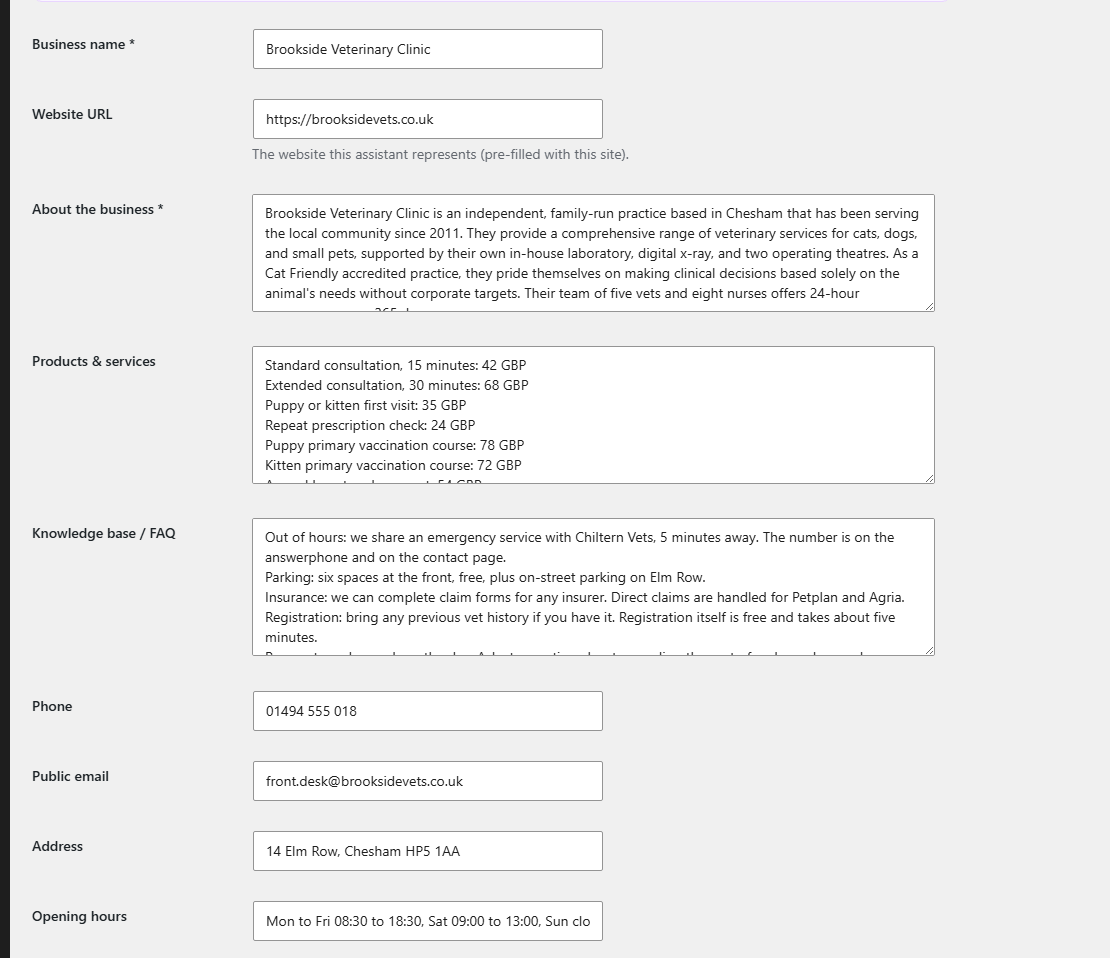
Four screens from a working install. Nothing here is a mockup.
It shows you what it learned, and lets you fix it.
Auto-fill reads your pages and writes this. Every word of it is a normal text box you can edit, so if your website is vague or out of date, you can see that and correct it before a single visitor is answered.
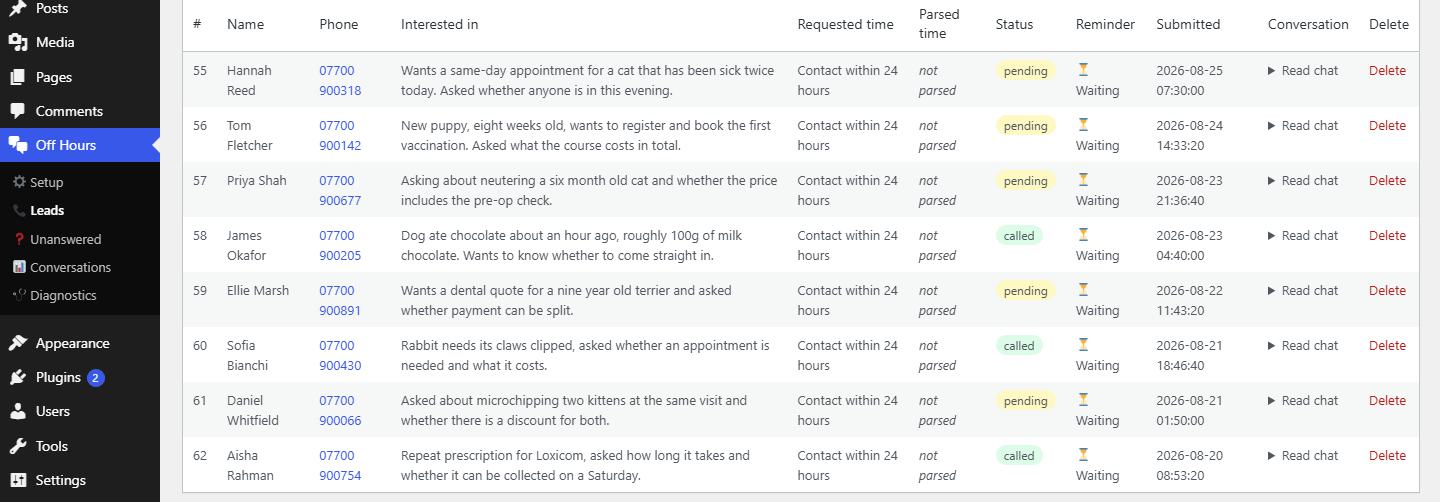
Every lead, with the reason they called.
Not a name and a number on their own. Each row carries the summary the assistant wrote, so you already know that Hannah has a cat that has been sick twice before you dial. The number is a link: on a phone, one tap calls it.
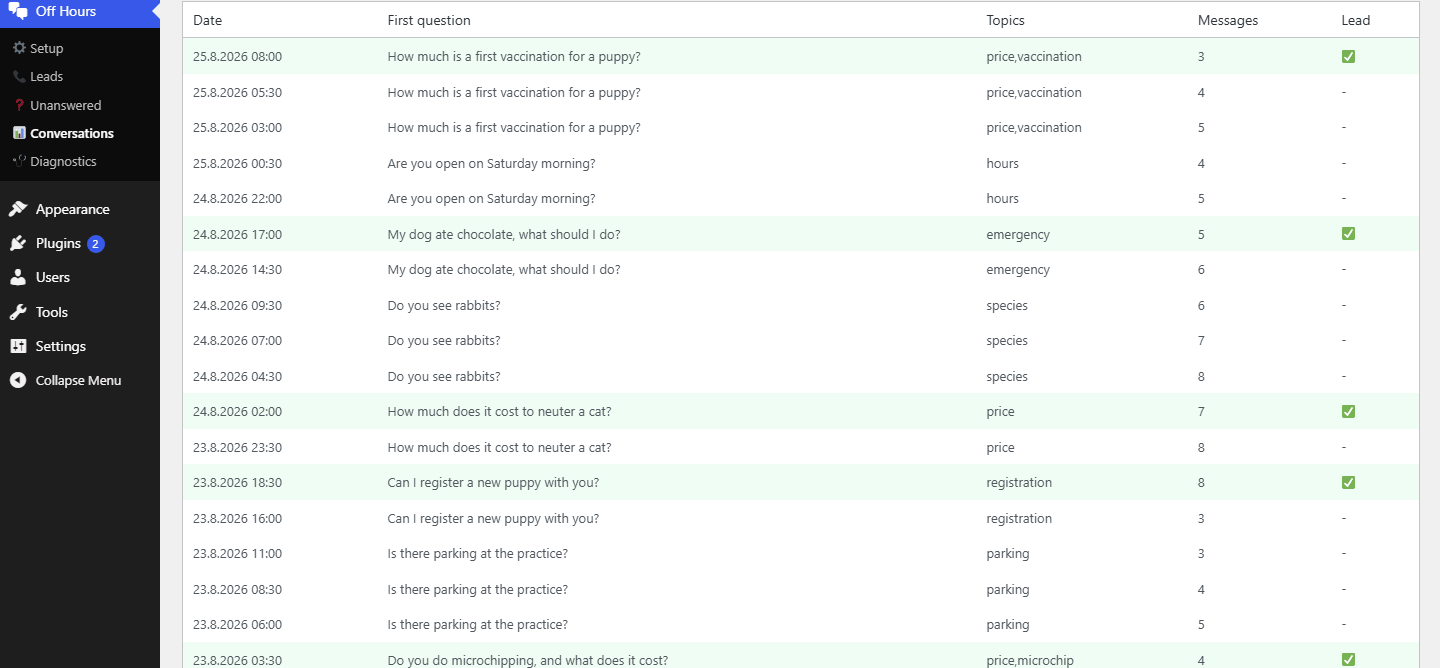
Every conversation it had, and which ones turned into leads.
The first question asked, the topics it fell under, how long the conversation ran, and whether it ended in a callback. This is also what the assistant learns from every six hours.
And the questions it could not answer.
The single most useful screen in the plugin. Every line is a real question your assistant fumbled, counted and dated. Answer it once in your profile and it never loses that customer again.

Captured from a demo practice with sample data, so the names, numbers and totals are invented. The screens themselves are the ones you get.
About five minutes
Setup is two steps
- 1
On WordPress: Plugins, Add New, Upload the file, Activate. On Wix, Squarespace, Shopify, Webflow or a hand-built site: paste one line of HTML, built for you at offhoursagent.com/setup.
- 2
Paste the licence key from your welcome email and press one button. It registers your site, reads your pages to learn what you do, and switches the assistant on. About five seconds.
There's a live test chat right on the settings page, so you can try it before a single visitor does.
32 languages built in, or leave it on auto and it replies in whatever language the visitor writes in.
A per-site daily message cap and per-IP rate limiting, so nobody can burn through your allowance.
The chat is 10 KB and loads after your page has finished, not alongside it, so it never competes with your own content. One request, and nothing more until a visitor types.
Uninstall optionally purges every trace of visitor data for GDPR.
Common questions
The things people ask before buying
Tap a question to see the answer.
Minimum is $49 a month with 500 conversations. Standard is $99 with 1,500. Enterprise is $197 with 4,000 pooled across up to 5 sites. Need more than five sites? Email us and we will sort it out. Every plan is billed monthly and you can cancel any time. Those prices are before tax, and VAT is added at checkout depending on your country.
No. The AI is included in the subscription. You do not create an account anywhere else and you do not get a second bill.
About five minutes. Install the plugin, then press auto-fill and it reads your own pages to learn your business. You check what it wrote and save.
The chat switches to a simple contact form for the rest of the month and we email you about it. We never charge you for extra conversations.
Almost certainly. On WordPress it is a plugin and wants WordPress 6.0 or newer on PHP 8.0 or newer. On Wix, Squarespace, Shopify, Webflow or a hand-built site it is one line of HTML, which needs nothing in particular. HTTPS is recommended either way.
It only answers from the business profile it read off your own pages, and you review and edit that profile any time. When it does not know something, it says so and offers a callback instead of guessing. On anything sensitive, pain, complaints, money, it drops the charm and hands the visitor to you.
Yes, 14 days on Minimum and Standard. You get your licence key at checkout and the assistant works fully from the first minute, so the trial is the real product rather than a cut-down version of it. We do take a card up front, and nothing is charged until the 14 days are up: cancel before then, from the link in your receipt, and you pay nothing. Enterprise does not have a trial, so email us and we will talk it through instead.
Yes. Email us within 30 days of your first payment and we will refund you in full. You do not have to give a reason and there is nothing to prove: no lead count, no usage minimum, no form. You can also cancel at any time from the link in any receipt.
Off Hours has a fixed monthly price with an included conversation allowance and no overage charges. Tidio offers Lyro AI separately or in a bundle, with quota-based pricing. Fin charges per outcome and can run without Intercom seats; its helpdesk plans add seat fees. Those products offer broader support workflows. Off Hours focuses on answering small-business website questions and capturing contact details for follow-up. See our pricing page for dated examples and vendor sources. More on this: compared with Tidio, compared with Intercom, what each plan includes, a chatbot for dentists, a chatbot for plumbers.
Requirements
For the WordPress plugin: WordPress 6.0+, PHP 8.0+. Everywhere else the embed needs nothing but somewhere to paste one line of HTML. HTTPS recommended either way.
Thirty day refund
The trial is 14 days and nothing is charged in it. After that, if it is not right for you, email us inside 30 days of your first payment and we refund you in full. No reason needed.
Off Hours is built and answered by the same small team. When you email support, it reaches us, not a ticket queue. Who we are
Founding customer
Five founding spots. 60 days free.
No card and no checkout, and you can set it up yourself in about ten minutes. If it brings you a real enquiry, tell us about it in two sentences.